Revid AI Review 2026: Is It Legit, Safe, and Worth It?
Quick Verdict
4.2Revid AI is one of the most comprehensive AI video platforms available in 2026 — 151 tools covering music videos, faceless content, brainrot, marketing ads, fandom videos, educational content, social clips, and more. The Growth plan is currently priced the same as Hobby ($39/month) while including 100+ AI tools, AI avatars, face swaps, 70+ language voiceovers, and direct publishing to TikTok, Instagram, and YouTube. At the same monthly price, Growth includes significantly more tools than Hobby — it's worth comparing the two before deciding.
Try Revid AI → See Pricing Plans* Affiliate link — we may earn a commission at no extra cost to you. Full disclosure →
What Is Revid AI?
Revid AI is an AI-powered video creation platform with 151 tools across 11 categories — one of the most comprehensive AI video platforms available in 2026. The core workflow is simple: choose a tool, provide your input (a prompt, script, audio file, URL, or image), and the platform generates a complete video ready to publish.
Unlike narrow AI video tools that do one or two formats well, Revid AI covers the full spectrum of content creation: music videos, faceless YouTube content, brainrot clips, marketing ads, fandom videos, educational content, podcast clips, social media formats, and more. The Growth plan includes 100+ of these tools along with AI avatars, face swaps, 70+ language voiceovers, and auto-publishing to TikTok, Instagram, and YouTube.
The platform has built a strong following among short-form content creators, musicians, faceless YouTube channel operators, and marketers who need high-volume video output without the time investment of traditional editing.
⚡ The 5 Revid AI tools that convert best
These are the five tools most commonly cited by creators when explaining why they chose Revid AI.
See real output examples on Revid AI Staff Picks →
Creation — 30 tools
Prompt to video, script to video, AI movie maker, cinematic videos, Sora 2, Veo3, 2D animation, ASMR, street interviews, and more.
Music — 22 tools
Music to video, lyrics to music video, animated lyric video, music visualizer, plus genre-specific generators: Hip Hop, Lofi, Phonk, Rock, EDM, Jazz, Metal, Techno, Drill.
See the full workflow: How to turn a Suno AI song into a music video with Revid AI →
Social — 18 tools
Script to video, Reddit post to video, Tweet/LinkedIn to video, YouTube Long to Shorts, AI Reels generator, YouTube to TikTok, roast generator, and more.
Editing — 13 tools
Motion transfer, face swap, auto captions, video translation (32 languages), AI subtitle generator, TikTok subtitle generator, motion graphics, audio enhancer.
Avatars — 7 tools
Talking avatar, video podcast generator, AI celebrity video, AI debate generator, deepfake video maker, and talking baby AI generator.
⚠️ Legal note: AI celebrity video and deepfake tools carry real legal exposure — right-of-publicity law, platform policy, and EU AI Act disclosure requirements all apply. Use only with explicit consent from the person depicted. Do not use for commercial content, satire, or impersonation involving real people without legal advice.
Marketing — 13 tools
Article to video, ad generator, PDF to video, UGC ad generator, website review video, screenshot to video ad, Amazon product video, real estate video, and more.
Brainrot — 10 tools
Minecraft parkour, Subway Surfers, Temple Run, Italian brainrot, PDF to brainrot, text to brainrot, abstract/space backgrounds, and satisfying video generator. Brainrot is one of Revid's most active tool categories — the Italian Brainrot and Minecraft parkour generators alone drive significant traffic to the platform because the format is in genuine high demand from creators building short-form channels.
Brainrot content layers an AI voiceover story over hypnotic background gameplay footage with rapid cuts — the same format driving hundreds of millions of views across TikTok and YouTube Shorts. Revid's templates handle the background footage selection, pacing, and assembly automatically.
🧠 Using Revid AI for Brainrot & Viral Content
The brainrot workflow in Revid AI is script-first: paste or generate a script, select a brainrot template (Italian Brainrot, Minecraft parkour, Subway Surfers, etc.), choose a voice, and Revid assembles the video with the appropriate background footage and pacing. The whole process takes under 5 minutes per video — practical for creators posting 1-3 short-form videos per day.
Use code CLIPVERDICT for 20% off your first month → try free first
Fandom — 26 tools
Marvel, Naruto, Pokémon, Minecraft, Roblox, Ghibli, Disney Pixar, Dragon Ball, Harry Potter, Star Wars, Game of Thrones, One Piece, and 14 more fandom templates.
Education — 4 tools
Educational video maker, explainer video maker, AI video presentation maker, food to nutrition video generator.
Audio — 3 tools
Audio/video to video, podcast AI clip generator, voiceover video maker. Extracts short viral clips from long-form audio automatically.
Lifestyle — 4 tools
Travel video maker, wedding video maker, create video from memories, AI birthday video message generator.
Auto-Mode Workers
Set up AI workers to automate your content pipeline end-to-end. Available on Growth (3 workers) and Ultra (10 workers) plans.
How Revid AI Works
The workflow is deliberately simple — no video editing experience required.
Choose your video type
Select from music video, lyric video, brainrot, faceless video, or anime generator depending on your content goal.
Upload your input or write a prompt
Depending on the format, upload an audio file, paste a script, enter a text prompt, or upload an image. Revid handles the rest.
Generate, preview and export
The platform renders your video — typically within a few minutes. Preview it, make basic adjustments, then export in your chosen format.
Revid AI in Practice — Our Testing Screenshots
These screenshots are from our own Revid AI account. They show the actual dashboard interface and real output quality — not marketing images.
The Dashboard — Tool Selection
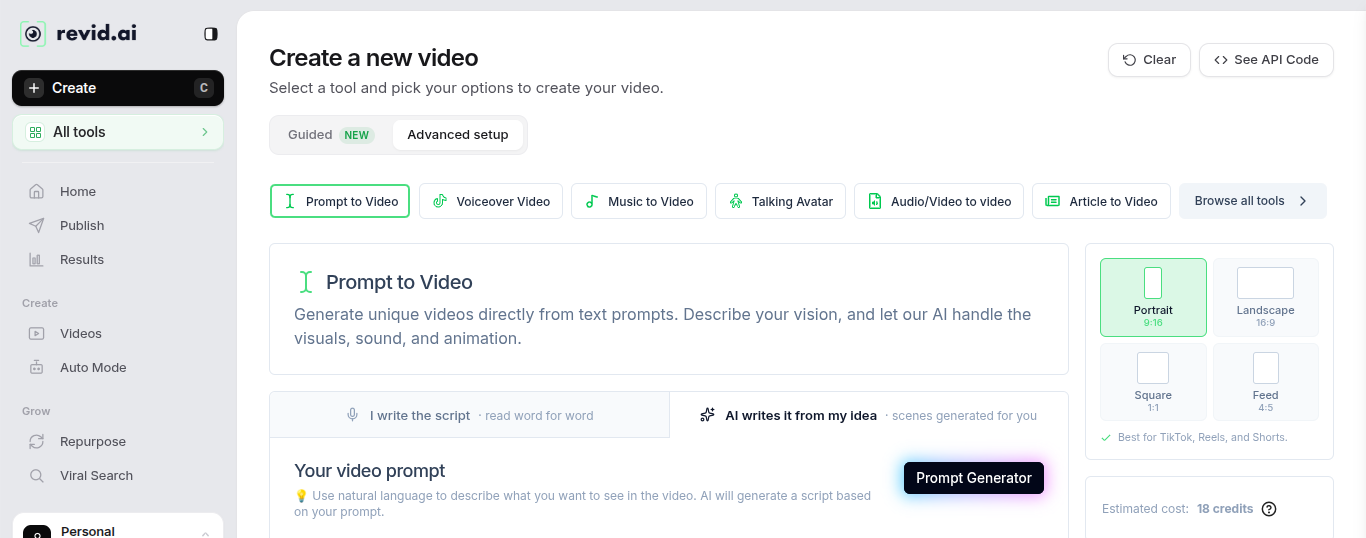
Prompt to Video tool — choose your own script or let AI write it. Estimated cost: 18 credits.
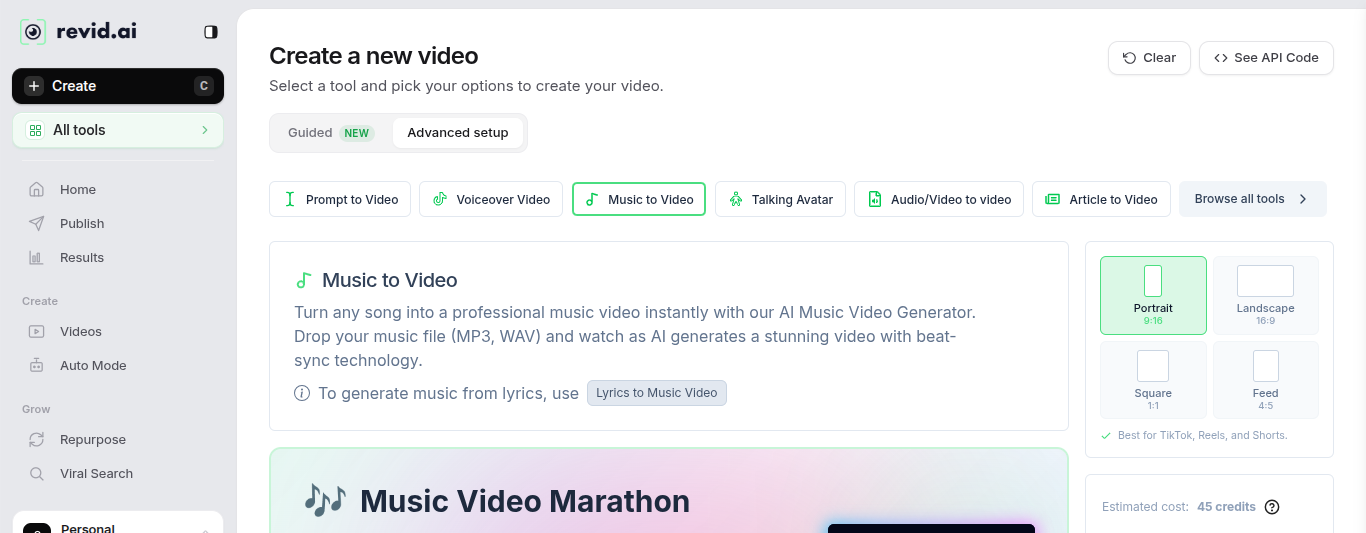
Music to Video tool — 9:16 portrait selected (TikTok/Reels/Shorts). Estimated cost: 45 credits.
Customise Options — Media Type Selector
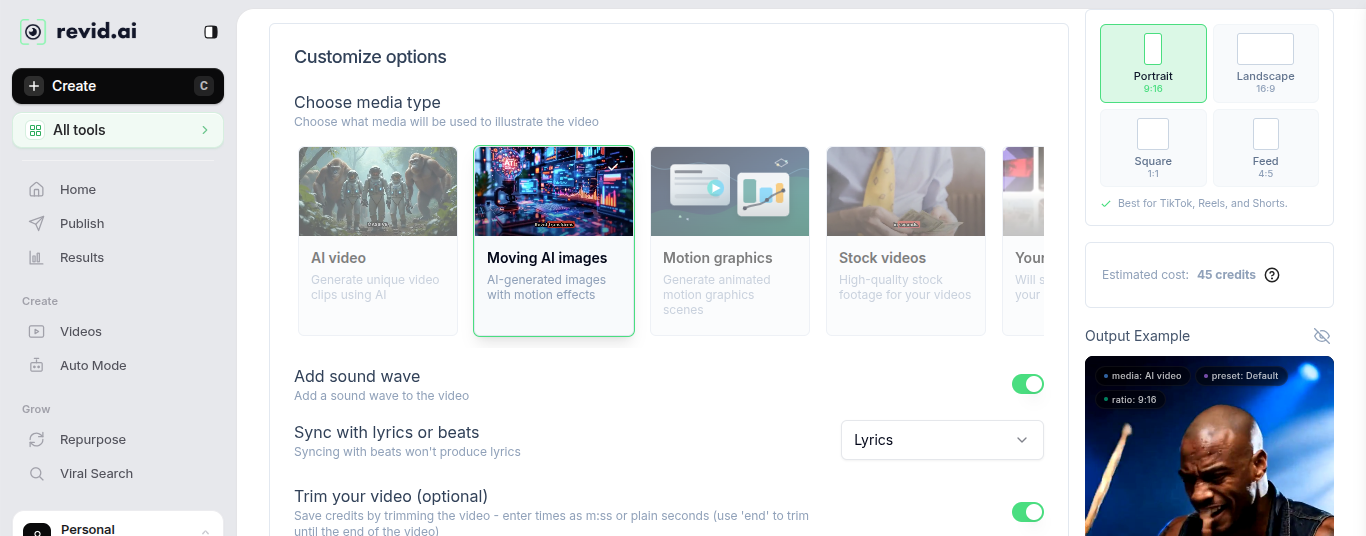
The media type selector inside a Music to Video generation. Moving AI images selected — AI-generated images with motion effects applied to the beat.
Output Quality — Three Tool Examples

Article to Video — cinematic output. Generated from a text article, no manual editing.

Talking Avatar — AI presenter with captions. No camera required.

Music to Video — beat-synced visuals with lyric captions. 2:03 run time.
Screenshots taken August 2026 from our own Revid AI account (Personal plan). Output quality may vary by plan and prompt complexity.
Revid AI Pricing in 2026
Three paid plans — Hobby, Growth, and Ultra — plus a free tier with no credit card required. See also: Is Revid AI free? — what you actually get.
What it actually costs per video
Tested on a real 1,187-word script across every render option on the Growth plan. Credit costs scaled linearly and predictably with word count — within 0.8% of the predicted rate in a cross-check, which is a genuine point in its favour for budgeting.
| Media type | Credits used | Approx. cost |
|---|---|---|
| Stock videos | 150 | ~$2.93 |
| AI Moving Images — Low | 244 | ~$4.76 |
| AI Moving Images — Pro | 526 | ~$10.26 |
| AI Video — Low | 1,560 | ~$30.42 |
| AI Video — Ultra | 9,550 | ~$186.23 |
Based on Growth plan (2,000 credits/$39/month). AI Video Ultra on a single long-form script exceeds the monthly credit allocation — budget accordingly or use Stock or AI Moving Images for regular volume.
- Create from text, links or recordings
- 3M+ viral videos to remix
- Editable short-form videos
- Cancel anytime
- 100% content ownership
- Latest AI video models
- 100+ AI video tools
- 3M+ viral videos to remix
- 70+ language voiceovers
- Hooks, scripts & rewrites
- Publish to TikTok, Instagram & YouTube
- AI avatars, face swaps & podcasts
- API access (verify availability at revid.ai — feature set subject to change)
- 3 Auto-Mode Workers
- Everything in Growth
- Create & clone voices
- 10 Auto-Mode Workers
- 12,000 AI credits per month (scalable to 200,000)
- Scale brands, niches or clients
💡 Use code CLIPVERDICT for 20% off your first month. Full details on our Revid AI promo codes page.
Revid AI Pros and Cons
✓ Pros
- Credit costs scale linearly and predictably with word count — easy to budget
- Stock video renders cost as little as ~$2.93 per long-form video
- Genuinely fast output — most videos render in under five minutes
- Excellent for music video, lyric video, brainrot, and faceless YouTube formats
- Direct publishing to TikTok, Instagram Reels, and YouTube Shorts
- 100% content ownership with commercial usage rights
- Cancel anytime from account settings — no friction
✕ Cons
- Long-form renders showed 3–4 visible defects each (misplaced limbs, incomplete objects) — every render needs editorial review
- The content-handling setting defaults to "Summarize" — switch to "Keep as is" for anything accuracy-sensitive or carefully worded
- AI Video Ultra can exceed a month's credit allocation on a single long-form video
- Shorts showed no defects in the same test period — long-form is the weaker format
- Not a fit for zero-input, fully automated output with no oversight
- Not a replacement for Adobe Premiere or DaVinci for complex edits
How We Scored Revid AI
Overall score: 4.2/5 — the average of six equally weighted subscores (ease of use 4.6, output quality 3.8, features 4.4, value 4.7, reliability 4.0, support 3.7). Feature range is genuinely exceptional at this price point; output quality and support scores reflect limitations noted in user feedback.
Is Revid AI Legit and Safe to Use?
This is one of the most common questions we see about Revid AI — and understandably so. Here is our honest assessment.
Is Revid AI a real company? ✓ Yes
Revid AI is a legitimate software company with a live product, paying customers, an active social media presence, and a publicly accessible website at revid.ai. It is not a scam. The platform has been operating long enough to accumulate a genuine user base and third-party reviews across Reddit, YouTube, and independent review sites.
Is Revid AI safe to use? ✓ Yes
Revid AI is safe to use. The platform uses standard account authentication, does not require a credit card to start a free account, and has a published privacy policy. As with any online platform, use a strong unique password. We found no credible reports of data misuse or security incidents associated with Revid AI.
Is Revid AI worth it in 2026? ✓ For the right use case
Revid AI is worth it if your content falls into its core use cases: music videos, lyric videos, brainrot clips, anime-style content, or faceless YouTube videos. If you need precise editorial control or corporate-quality production, a traditional editor will serve you better. For social content creators, the time saved versus manual editing makes the paid plan a reasonable investment.
Any red flags? Minor caveats only
The only notable friction points are typical of growing SaaS products: occasional render delays during peak times, a credit system that can feel limiting on lower plans, and support response times some users report as slower than ideal. None of these are dealbreakers or indicate the platform is unsafe.
Who Is Revid AI Best For?
Revid's own 2025 platform data shows its typical user is making short, meme-adjacent, or AI/tech content — 55.3% faceless voiceover, 9:16 vertical, AI/Tech the dominant category. A long-form, research-heavy use case sits outside the platform's norm, not at its centre.
Musicians and artists
Music videos and lyric videos without hiring a video editor. Upload your track and get a finished video in minutes.
Short-form content creators
TikTok and Reels creators who need high-volume output fast. Shorts rendered without visible defects in our testing — the strongest format on the platform.
Faceless YouTube operators
Building a real content pipeline where you review every render. Script to video with auto-publishing handles the production side — editorial review is still your job.
Beginners with no editing experience
If traditional editors feel overwhelming, Revid removes the learning curve. No timeline, no keyframes. Stock video renders cost as little as ~$2.93 per video.
Not ideal for: Anyone expecting zero-input fully automated output with no editorial oversight. Long-form renders consistently showed 3–4 defects per video in our testing. It is a good fit if you are comfortable reviewing every render — a weaker fit if you are not. For full creative control, see our guide to the best video editing software.
Real Output: Video Created With Revid AI
This short was generated entirely with Revid AI's Prompt to Video tool — no camera, no manual editing, no voiceover recorded separately. The prompt, settings, and output are exactly what a first-time user would produce.
Generated with Revid AI Prompt to Video, 9:16 portrait format, captions on. Try it yourself — use code CLIPVERDICT for 20% off at revid.ai →
See It In Action: Faceless YouTube Channel Tutorial
This tutorial from the Revid AI team walks through building a faceless YouTube channel using Revid AI and ElevenLabs — the same workflow ClipVerdict uses for AI video production. Worth watching before you decide on a plan.
Tutorial covers the full workflow: script → Revid AI video generation → ElevenLabs voiceover → publishing. Both tools have affiliate links in our description below.
Music to Video Tutorial
If music content is your focus — music videos, lyric videos, beat-synced visuals — this walkthrough shows exactly how the Music to Video tool works inside Revid AI.
More tutorials available at revid.ai/blog/tutorials →
Our Final Verdict on Revid AI
Revid AI earns 4.2 out of 5 from ClipVerdict. It is a legitimate platform with predictable credit costs, direct publishing to TikTok, Instagram, and YouTube, and strong output for short-form and music video formats. Tested on a real 1,187-word script: Stock video renders cost as little as ~$2.93 per video with credit costs that scale predictably. Long-form renders consistently showed 3–4 visible defects each — every output needs editorial review before publishing. The content-handling setting defaults to "Summarize" — switch to "Keep as is" for accuracy-sensitive content. It is a strong production tool for creators building a real content pipeline who are comfortable reviewing renders. It is not a fit for zero-input fully automated output with no oversight.
It is not a tool for professional editors or high-production video work — and it doesn't try to be. Within its lane, it does its job well and saves creators hours of editing time per video.
Try Revid AI Free →* We earn a commission if you upgrade to a paid plan. This does not affect our rating. Full disclosure