Magic Hour Review (2026)
Lip sync, face swap, and AI video editor — tested with real outputs. Credit costs documented. No press kit opinions.
Magic Hour at a Glance
What Is Magic Hour?
Magic Hour is an AI video and image platform with over 35 tools covering video generation, editing, and transformation. Where most AI video tools focus on generating content from scratch — text to video, script to video — Magic Hour focuses heavily on transforming existing footage: swapping faces, syncing new dialogue to existing video, changing locations, and editing scenes with text prompts.
The platform operates on a credit-based subscription model. Tools vary significantly in credit cost, which makes real-world cost testing more informative than plan pricing alone.
Magic Hour is free to try with daily credits and no credit card required. Watermark-free exports require a paid plan.
What Was Tested
Magic Hour has a wide range of tools. For this review, three were tested hands-on with real outputs:
- Photo-to-Video Lip Sync — animating a still image to match a voiceover
- Face Swap — replacing the face in an existing video with a different character
- AI Video Editor — changing the location of a scene using a text prompt
Each test used original assets created specifically for this review. The character was generated in Google Flow. The voiceover was created in ElevenLabs. No stock footage or demo assets were used.
Test 1 — Photo-to-Video Lip Sync
A character image was created in Google Flow and a voiceover was generated in ElevenLabs using a 15-second script. Both were fed into Magic Hour's Lip Sync tool in photo-to-video mode.
The initial test used a 30-second script. The first 15 seconds synced cleanly — mouth movement matched the audio with no noticeable drift. After the 15-second mark the sync deteriorated. Based on that finding the script was cut to 15 seconds and the test was run again. The output was solid.
Watch the output:
Raw output from Magic Hour's photo-to-video lip sync tool. Character created in Google Flow, voiceover created in ElevenLabs. No post-processing applied.
Test 2 — Face Swap
The 15-second lip sync output from Test 1 was used as the source video. A second character was created with a darker skin tone and locs and fed into Magic Hour's face swap tool.
The two characters used in this test

Original character — created in Google Flow
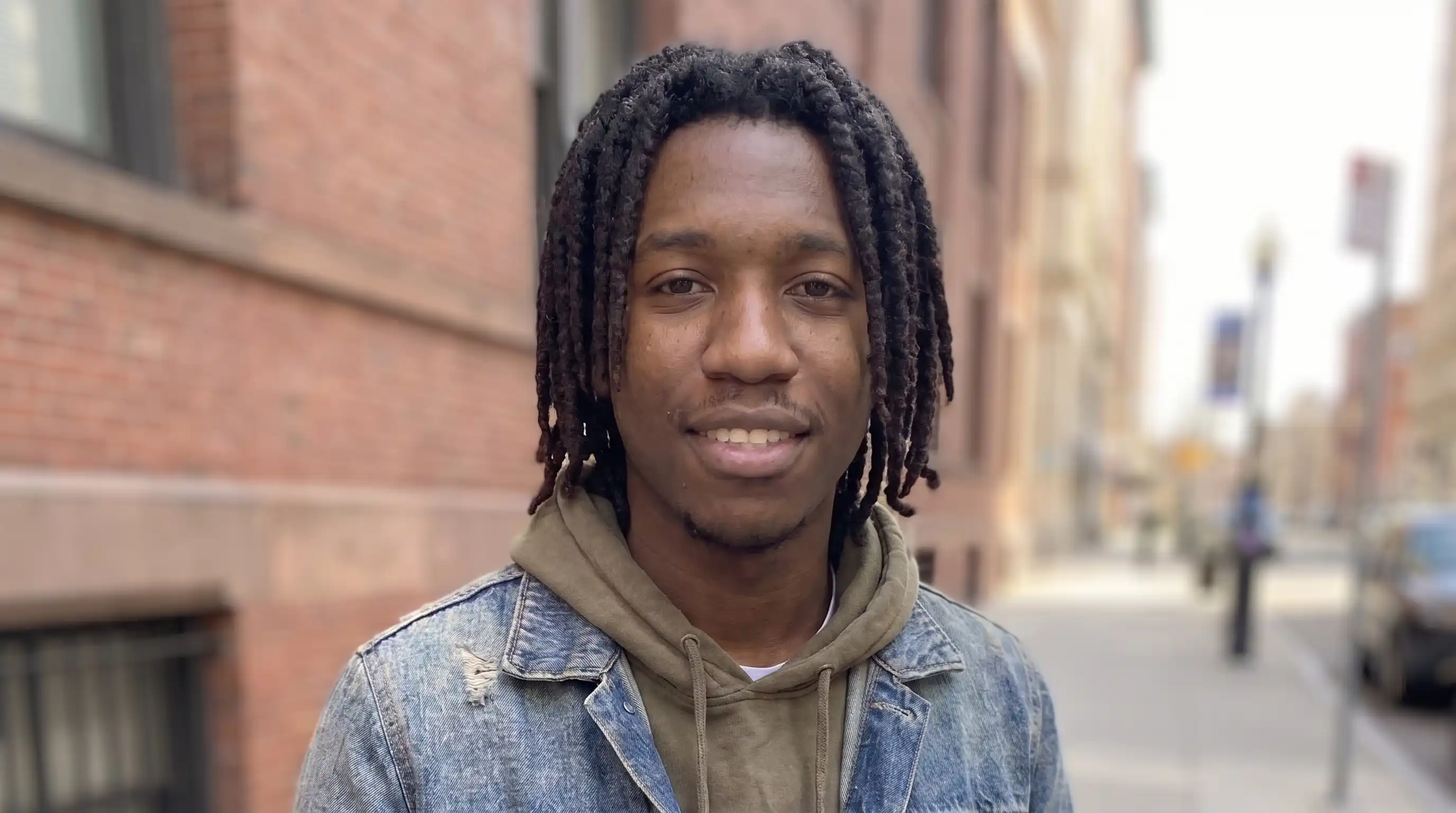
Replacement character — created in Google Flow
Both characters share a similar skin tone baseline, which explains why the swap was subtle — Magic Hour transferred specific facial features (nose shape, teeth) from the replacement rather than performing a complete identity change. The hairstyle, clothing, and overall facial structure from the original largely persisted.
Watch the output:
Face swap applied to the lip sync output from Test 1. Replacement character had a darker skin tone and locs. Raw output — no post-processing.
Test 3 — AI Video Editor
The original character video from Test 1 was used as the source. A text prompt was used to change the setting from an outdoor basketball court to an indoor basketball court.
The output came in at 10 seconds rather than the full 15 — it cut off early but landed at a natural stopping point with no awkward ending.
Watch the output:
Scene changed from outdoor to indoor basketball court using Magic Hour's AI Video Editor. Text prompt only — no manual masking or keyframing. Raw output.
AI Music Video: Mississippi Heat
After testing the individual tools, we used Magic Hour's Music Video generator to produce a complete blues music video. The character — an older Black blues musician — was generated from a photo and synced to an original track called "Mississippi Heat." No filming, no editing software, no green screen.
Watch the output:
Full AI-generated blues music video produced with Magic Hour. Character created from a photo. Raw output — no post-processing.
What It Actually Costs — Credit Summary
Credit costs vary significantly across tools. These figures are from ClipVerdict's hands-on testing — not estimates from the pricing page.
| Tool | Mode | Clip length | Credits used |
|---|---|---|---|
| Lip Sync | Photo to video | 15 seconds | 720 |
| Face Swap | Video to video | 15 seconds | 600 |
| AI Video Editor | Scene change | 10 seconds | 1,440 |
On the Creator plan (144,000 credits/year at $12/month annual): that allocation covers approximately 200 lip sync clips, 240 face swap clips, or 100 AI Video Editor scene changes at the rates above — not a combination of all three at volume. Heavy users of the AI Video Editor should budget for the Pro plan (300,000 credits/year) or use credit packs.
Magic Hour Pricing
Three subscription tiers plus credit packs for one-off top-ups. All paid plans and credit packs include watermark-free exports, commercial use, API access, and access to all tools. Free image tool outputs are watermark-free; free video outputs carry a watermark.
~1.7 hrs video / 28,800 images
1024px resolution
3 concurrent generations
2GB file upload limit
~3.5 hrs video / 60,000 images
1472px resolution
5 concurrent generations
5GB file upload limit
~9.7 hrs video / 168,000 images
4K resolution
Unlimited concurrent generations
10GB file upload limit
Credit packs (credits never expire)
| Pack | Credits | Price | Rate |
|---|---|---|---|
| Starter | 4,000 | $10 | $1 = 400 credits |
| Standard | 12,000 | $27 | $1 = 444 credits |
| Large | 32,000 | $64 | $1 = 500 credits |
| Max | 64,000 | $120 | $1 = 533 credits |
Credit packs include commercial-use rights and watermark-free exports. Unused subscription credits and purchased credits roll over indefinitely — they do not expire.
Pros and Cons
Pros
- ✓Free daily credits with no credit card required
- ✓Lip sync quality is solid within the 15-second window
- ✓AI Video Editor scene change looked natural — not obviously AI
- ✓35+ tools in one platform — covers video, image, and audio
- ✓Commercial use included on all paid plans
- ✓Credit packs never expire — good for occasional users
Cons
- ✗Lip sync drifts after 15 seconds — segment workflow required for longer scripts
- ✗Face swap result is subtle — not a complete identity replacement
- ✗AI Video Editor is the most credit-intensive tool tested — 1,440 credits for 10 seconds
- ✗4K resolution only on Business plan ($66/mo annual)
Who Magic Hour Is Best For
Magic Hour's strength is in transforming existing footage rather than generating from scratch. It suits creators who have source material — a recorded clip, a generated image, a finished voiceover — and want to modify specific elements of it without a full editing suite.
ClipVerdict Verdict
Magic Hour earns 4.0 out of 5. It delivers on the core promise — transforming existing footage using AI tools — with a platform that is genuinely broad and accessible. The free daily credits with no credit card required is one of the more generous entry points in the AI video space.
The findings from hands-on testing are specific: lip sync is solid within a 15-second window and degrades beyond it; face swap transfers specific facial features rather than replacing identity wholesale; the AI Video Editor scene change produced a result that looked natural and edited rather than artificially generated. All three outputs were publishable.
The credit cost structure rewards understanding — the AI Video Editor is significantly more expensive per second than lip sync or face swap, and that matters for budgeting at volume. The lack of an affiliate program means no commission is earned through ClipVerdict referrals, which is noted for transparency.
For creators working in the footage-transformation space — dubbing, character swapping, location editing — Magic Hour is one of the more capable platforms available at this price point.
Try Magic Hour Free →No affiliate relationship. UTM referral tracking only. Pro account provided by Magic Hour for evaluation.